I play a bit of music using a Hohner Special 20 bluesharp.
However I am not quick enough at reading sheet music, so I need to add tabs.
Tabs basically tell you the number of the hole to play and whether to blow or draw (-).
Lilypond is a concise programming language to generate sheet music.
It turns out, that it is very easy to add lyrics using Lilypond.
By putting the tabs in double quotes it is possible to add the tabs to the music.
I found the tune Hard Times on the Internet and I used Lilypond to create a version with tabs.
Here is the Lilypond code:
\version "2.22.0"
\header {
  title = "Hard Times"
  composer = "Stephen Foster"
  instrument = "Bluesharp"
}
\relative {
  r2 c'4 d
  e2 e4 d
  e8 g4.~ g4 e
  d4 c c d8 c
  e2 c'4 a
  g2 e8 c4.
  d4. c8 e4 d
  c1~
  c2 c4 d
  e2 e4 d
  e8 g4.~ g4 e
  d4 c c d8 c
  e2 c'4 a
  g2 e8 c4.
  d4. c8 e4 d
  c1~
  c2 e4 f4
  g2. g4
  g2 f4 g4
  a1
  g2 r2
  c2 a8 g4.
  e2 d8 c4.
  d4. c8 d4 e
  d2 c4 d
  e2 e4 d
  e8 g4.~ g4 e
  d4 c c d8 c
  e2 c'4 a
  g2 e8 c4.
  d4. c8 e4 d
  c1~
  c4 r4 r2
}

\addlyrics {
  "4" "-4" "5" "5" "-4" "5" "6" "5" "-4" "4" "4" "-4" "4" "5" "7" "-6" "6" "5" "4" "-4" "4" "5" "-4" "4"
  "4" "-4" "5" "5" "-4" "5" "6" "5" "-4" "4" "4" "-4" "4" "5" "7" "-6" "6" "5" "4" "-4" "4" "5" "-4" "4"
  "5" "-5" "6" "6" "6" "-5" "6" "-6" "6" "7" "-6" "6" "5" "-4" "4" "-4" "4" "-4" "5" "-4"
  "4" "-4" "5" "5" "-4" "5" "6" "5" "-4" "4" "4" "-4" "4" "5" "7" "-6" "6" "5" "4" "-4" "4" "5" "-4" "4"
}
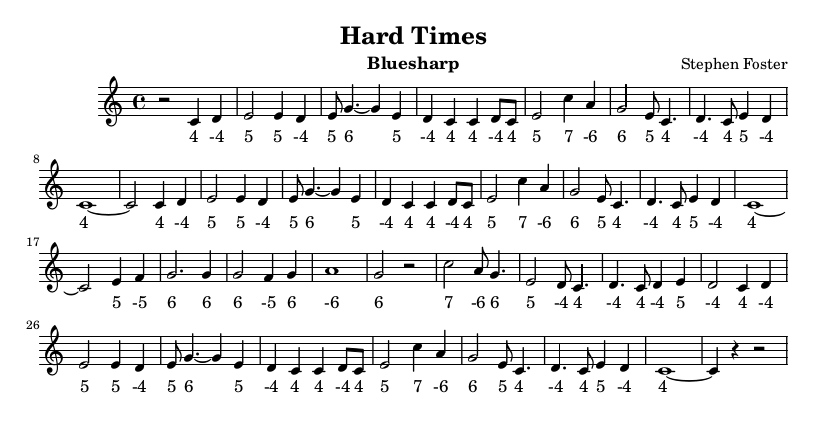
Here is the output generated by Lilypond.
Notice how the tabs and the notes are aligned to each other.
You can click on the image to open the PDF file.
By the way, I can really recommend to sign up for David Barrett’s harmonica videos to learn tongue blocking which is essential to play single notes as in this example.
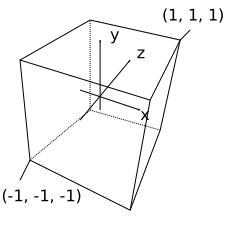
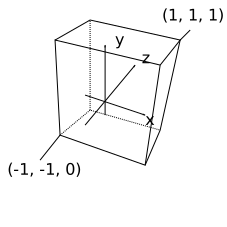
By default the OpenGL 3D normalized device coordinates (NDC) are between -1 and +1.
x is from left to right and y is from bottom to top of the screen while the z-axis is pointing into the screen.
Usually the 3D camera coordinates of the object are mapped such that near coordinates are mapped to -1 and far values are mapped to +1.
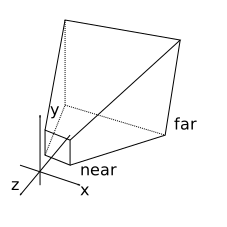
The near and far plane define the nearest and farthest point visualized by the rendering pipeline.
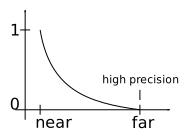
The absolute accuracy of floating point values is highest when the values are near zero.
This leads to the depth accuracy to be highest somewhere between the near and far plane which is suboptimal.
A better solution is to map near coordinates to 1 and far coordinates to 0.
In this case the higher precision near zero is used to compensate for the large range of distances covered towards the far plane.
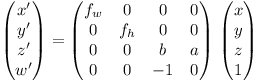
Let x, y, z, 1 be the homogeneous coordinate of the 3D point and x’, y’, z’, w’ the homogeneous NDC.
Normally the 3D point uses a right-handed coordinate system where the z-axis points out of the screen.
This means that x and y are projected using negative z, i.e. w’ = -z.
The camera projection equations are x’/w’ = fw x/-z and y’/w’ = fh y/-z.
Substituting w’ = -z we get x’ = fw x and y’ = fh y.
Setting z’ = a + b z we get the following matrix equation:
When z = -near, we want z’/w’ = 1.
When z = -far, we want z’/w’ = 0.
For z = -near we get: z’ = w’ => a + b z = -z => a - b near = near.
For z = -far we get: z’ = 0 => a + b z = 0 => a - b far = 0 <=> b = a / far.
Substituting b we get: a - a near / far = near <=> a = near far / (far - near)
This means b = a / far = near / (far - near).
I.e. we get:
and
Finally we set fw = 1 / tan(fov / 2) where fov is the horizontal field of view angle (e.g. 60 degrees in radians).
fh then needs to be chosen such that fh / fw = w / h, where w and h are the width and height of the screen.
This is a summary on how to install Debian on a physical machine (as opposed to a VM).
I installed Debian 11 with KDE desktop on my HP 255 G3 notebook.
Because my computer has an AMD GPU it is recommended to download the unofficial Debian image with firmware.
The unofficial image also helps with Wireless adapters which frequently require proprietary firmware.
I downloaded the image which is 4 GByte in size and wrote it to a USB stick:
Replace /dev/sdb with your correct USB location! You can see the location in the log (run sudo dmesg) after plugging it in.
Under Windows you can use a tool such as Rufus to create a bootable USB stick.
I usually create a list of packages of my current system so that I can later install the same packages on the new system.
aptitude search '!~M ~i'-F'%p'> install.txt
I rebooted the computer.
My laptop uses UEFI secure boot so you need to press Escape and then F9 to get a list of bootable devices.
The Debian installer image on the USB stick should show up in the list. Select it and press return.
I proceeded to use the graphical installer.
The Debian installer can shrink Windows partitions if you want to set up dual boot.
Note that you need to disable Windows fast startup, otherwise your Windows file system will be in a hibernated state.
On my machine I created a swap partition about the same size as the computer memory.
I already have a 16 GByte root (/) ext4 partition (should be a bit bigger ideally) and a large home (/home) ext4 partition.
I just format the root partition and simply mount the home partition without formatting.
After setting up the users I can already continue using the system.
I noticed that even the unofficial image is missing some firmware.
So I cloned the Linux firmware repository and copied the firmware files:
git clone --depth 1 https://git.kernel.org/pub/scm/linux/kernel/git/firmware/linux-firmware.git
cd linux-firmware
sudo make install
Last week I published a minimal OpenGL example in Clojure.
The example was implemented using LWJGL version 2 (see LWJGL Wiki for documentation).
My motivation is to implement a space flight game, which requires rendering of planetary bodies.
I found an impressive free software called the Oreon Engine which is implemented in Java.
Watching the videos I realised that I should investigate tessellation shaders.
I didn’t find any small single-page code examples for tessellation shaders, so I decided to publish one here.
The example is implemented in Clojure but could be easily ported to C if you prefer.
The example uses several shaders required when doing tessellation using OpenGL:
a vertex shader
a tessellation control shader
a tessellation evaluation shader
a geometry shader
a fragment shader
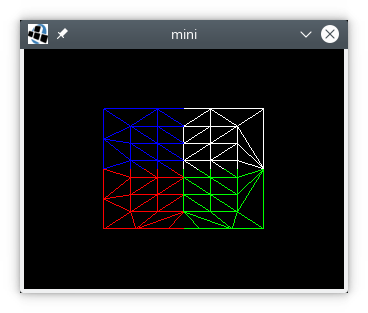
The example not only shows how to set the tessellation level but it also shows how one can pass through texture coordinates.
The polygon mode was switched to display lines only so that one can observe how the triangle is split up.
Two years ago I published a minimal OpenGL example in C.
Recently I got renewed interest in the Clojure programming language
(if you want to learn Clojure, I can recommend the book Clojure in Action by the way).
I hope to do some game development in Clojure.
Initially I tried JOGL (Java Bindings for OpenGL), but then I switched to LWJGL version 2 (Lightweight Java Game Library).
There is a Debian package for LWJGL version 2 and there is extensive documentation on the LWJGL Wiki.
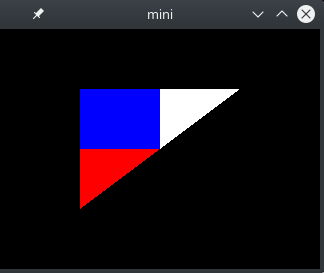
Using this library, I have translated my earlier example to Clojure.
See code below:
(nsraw-opengl(:import[org.lwjglBufferUtils][org.lwjgl.openglDisplayDisplayModeGL11GL12GL13GL15GL20GL30]))(defvertex-source"#version 130
in mediump vec3 point;
in mediump vec2 texcoord;
out mediump vec2 UV;
void main()
{
gl_Position = vec4(point, 1);
UV = texcoord;
}")(deffragment-source"#version 130
in mediump vec2 UV;
out mediump vec3 fragColor;
uniform sampler2D tex;
void main()
{
fragColor = texture(tex, UV).rgb;
}")(defvertices(float-array[0.50.50.01.01.0-0.50.50.00.01.0-0.5-0.50.00.00.0]))(defindices(int-array[012]))(defpixels(float-array[0.00.01.00.01.00.01.00.00.01.01.01.0]))(defnmake-shader[sourceshader-type](let[shader(GL20/glCreateShadershader-type)](GL20/glShaderSourceshadersource)(GL20/glCompileShadershader)(if(zero?(GL20/glGetShaderishaderGL20/GL_COMPILE_STATUS))(throw(Exception.(GL20/glGetShaderInfoLogshader1024))))shader))(defnmake-program[vertex-shaderfragment-shader](let[program(GL20/glCreateProgram)](GL20/glAttachShaderprogramvertex-shader)(GL20/glAttachShaderprogramfragment-shader)(GL20/glLinkProgramprogram)(if(zero?(GL20/glGetProgramiprogramGL20/GL_LINK_STATUS))(throw(Exception.(GL20/glGetProgramInfoLogprogram1024))))program))(defmacrodef-make-buffer[methodcreate-buffer]`(defn~method[data#](let[buffer#(~create-buffer(countdata#))](.putbuffer#data#)(.flipbuffer#)buffer#)))(def-make-buffermake-float-bufferBufferUtils/createFloatBuffer)(def-make-buffermake-int-bufferBufferUtils/createIntBuffer)(Display/setTitle"mini")(Display/setDisplayMode(DisplayMode.320240))(Display/create)(defvertex-shader(make-shadervertex-sourceGL20/GL_VERTEX_SHADER))(deffragment-shader(make-shaderfragment-sourceGL20/GL_FRAGMENT_SHADER))(defprogram(make-programvertex-shaderfragment-shader))(defvao(GL30/glGenVertexArrays))(GL30/glBindVertexArrayvao)(defvbo(GL15/glGenBuffers))(GL15/glBindBufferGL15/GL_ARRAY_BUFFERvbo)(defvertices-buffer(make-float-buffervertices))(GL15/glBufferDataGL15/GL_ARRAY_BUFFERvertices-bufferGL15/GL_STATIC_DRAW)(defidx(GL15/glGenBuffers))(GL15/glBindBufferGL15/GL_ELEMENT_ARRAY_BUFFERidx)(defindices-buffer(make-int-bufferindices))(GL15/glBufferDataGL15/GL_ELEMENT_ARRAY_BUFFERindices-bufferGL15/GL_STATIC_DRAW)(GL20/glVertexAttribPointer(GL20/glGetAttribLocationprogram"point")3GL11/GL_FLOATfalse(*5Float/BYTES)(*0Float/BYTES))(GL20/glVertexAttribPointer(GL20/glGetAttribLocationprogram"texcoord")2GL11/GL_FLOATfalse(*5Float/BYTES)(*3Float/BYTES))(GL20/glEnableVertexAttribArray0)(GL20/glEnableVertexAttribArray1)(GL20/glUseProgramprogram)(deftex(GL11/glGenTextures))(GL13/glActiveTextureGL13/GL_TEXTURE0)(GL11/glBindTextureGL11/GL_TEXTURE_2Dtex)(GL20/glUniform1i(GL20/glGetUniformLocationprogram"tex")0)(defpixel-buffer(make-float-bufferpixels))(GL11/glTexImage2DGL11/GL_TEXTURE_2D0GL11/GL_RGB220GL12/GL_BGRGL11/GL_FLOATpixel-buffer)(GL11/glTexParameteriGL11/GL_TEXTURE_2DGL11/GL_TEXTURE_WRAP_SGL11/GL_REPEAT)(GL11/glTexParameteriGL11/GL_TEXTURE_2DGL11/GL_TEXTURE_MIN_FILTERGL11/GL_NEAREST)(GL11/glTexParameteriGL11/GL_TEXTURE_2DGL11/GL_TEXTURE_MAG_FILTERGL11/GL_NEAREST)(GL30/glGenerateMipmapGL11/GL_TEXTURE_2D)(GL11/glEnableGL11/GL_DEPTH_TEST)(while(not(Display/isCloseRequested))(GL11/glClearColor0.00.00.00.0)(GL11/glClear(bit-orGL11/GL_COLOR_BUFFER_BITGL11/GL_DEPTH_BUFFER_BIT))(GL11/glDrawElementsGL11/GL_TRIANGLES3GL11/GL_UNSIGNED_INT0)(Display/update)(Thread/sleep40))(GL20/glDisableVertexAttribArray1)(GL20/glDisableVertexAttribArray0)(GL11/glBindTextureGL11/GL_TEXTURE_2D0)(GL11/glDeleteTexturestex)(GL15/glBindBufferGL15/GL_ELEMENT_ARRAY_BUFFER0)(GL15/glDeleteBuffersidx)(GL15/glBindBufferGL15/GL_ARRAY_BUFFER0)(GL15/glDeleteBuffersvbo)(GL30/glBindVertexArray0)(GL30/glDeleteVertexArraysvao)(GL20/glDetachShaderprogramvertex-shader)(GL20/glDetachShaderprogramfragment-shader)(GL20/glDeleteProgramprogram)(GL20/glDeleteShadervertex-shader)(GL20/glDeleteShaderfragment-shader)(Display/destroy)