Implement an Interpreter using Bison, Flex, and Automake

This is a small example on how to implement an interpreter using Flex, Bison (formerly known as Yacc), and the Autotools. The example is based on Ben Reichard’s course material.

Dependencies

First you need to install the C compiler, the lexer, and the LALR parser generator for this project. It also helps to install the readline wrapper utility.

sudo aptitude install build-essential bison flex rlwrap

Build system

You need to create the file Makefile.dist with the following content.

all:
	aclocal
	autoheader
	libtoolize --force
	automake -a --foreign
	autoconf

configure:
	./configure

Then you create the file configure.ac with the following content.

AC_INIT(aclocal.m4)
AM_INIT_AUTOMAKE([calculator], [1.0.0])
AC_CONFIG_MACRO_DIR([m4])
AC_PROG_CC
AC_PROG_INSTALL
AC_PROG_LN_S
AC_PROG_YACC
AC_PROG_LEX
AM_PROG_LIBTOOL
AM_CONFIG_HEADER(config.h)
AC_CHECK_HEADERS([stdio.h])
AC_OUTPUT(Makefile)

Finally you create the file Makefile.am with the following content.

SUFFIXES = .c .h .y .l

ACLOCAL_AMFLAGS = -I m4

AM_YFLAGS = -d

bin_PROGRAMS = calculator

calculator_SOURCES = calculator.c calc_bison.y calc_flex.l
calculator_LDFLAGS = 
calculator_LDADD =

noinst_HEADERS = calculator.h

BUILT_SOURCES = calc_bison.h

EXTRA_DIST = Makefile.dist configure.ac

CLEANFILES = *~

MAINTAINERCLEANFILES = aclocal.m4 config.guess config.sub configure \
	install-sh ltmain.sh Makefile.in missing mkinstalldirs stamp-h.in \
	libtool config.cache config.h config.h.in acinclude.m4 depcomp \
	ylwrap

maintainer-clean-local:
	-rm -rf m4

This completes the setup of the build system.

Implementation

First create the file calc_bison.y with the implementation of the parser.

%{
#include <stdio.h>

void yyerror(char *s) {
  fprintf(stderr, "%s\n", s);
}

int sym[26];
%}

%union {
  int number;
  int var;
};

%type <number> expression
%token <var> VAR
%token <number> NUMBER

%%

start: expression '\n' { printf("%d\n\n", $1); } start
     | /* NULL */
     ;

expression: NUMBER
          | VAR                       { $$ = sym[$1]; }
          | '-' expression            { $$ = -$2; }
          | expression '+' expression { $$ = $1 + $3; }
          | expression '-' expression { $$ = $1 - $3; }
          | expression '*' expression { $$ = $1 * $3; }
          | '(' expression ')'        { $$ = $2; }
          | VAR '=' expression        { sym[$1] = $3; $$ = $3; }
          ;

Then create the file calc_flex.l with the implementation of the lexer (tokenizer).

%{
#include "calc_bison.h"
%}

%option noyywrap
%option always-interactive

%%

[0-9]+     { yylval.number = atoi(yytext); return NUMBER; }

[a-z]      { yylval.var = *yytext - 'a'; return VAR; }

[-+()*\n=] { return *yytext; }

[ \t]      ;

.          yyerror("Unknown character");

%%

Then create the header file calculator.h for the parser.

#ifndef CALCULATOR_H
#define CALCULATOR_H

int yyparse(void);
extern int sym[26];

#endif

Finally create the file calculator.c with the main program.

#include "calculator.h"

int main(void)
{
  int i;
  for (i=0; i<26; i++) sym[i] = 0;
  yyparse();
  return 0;
}

Compiling and running it

Above program is built using the following steps.

make -f Makefile.dist
./configure
make

You can run the calculator as follows.

./calculator

Alternatively you can run the interpreter with rlwrap to get command line history.

rlwrap ./calculator

Here is a sample session using the calculator program.

1
1

1 + 2
3

a = 1 + 2
3

b = a * 3
9

(1 + 2) * 3
9

(x = b) + 1
10

x
9

The code is also available on Github. You can get a copy using Git:

git clone https://github.com/wedesoft/calculator.git

Enjoy!

See also

Developing machine vision software with Ruby instead of C/C++

When I started doing a PhD in machine vision in 2004 I didn’t know what I was in for. I thought I would learn about various object recognition algorithms, implement them in C++, and then try to come up with something new. I was motivated to implement 2D object recognition and tracking algorithms and I was hoping to eventually get into 3D object recognition/tracking and/or Visual SLAM (simultaneous localisation and mapping).

The trouble started when I started to realise how many representations of images there are. I am not even talking about colour spaces or compressed images/videos. It is already sufficient to just consider one-channel grey images. Virtually every C/C++ library for handling images comes with its own data structures for representing images. I.e. when trying to use more than one C/C++ library at a time, one ends up writing a lot of code for converting between different representation of images.

It get’s worse. CPUs usually offer arithmetic using 8-bit, 16-bit, 32-bit, and 64-bit integers which can be signed or unsigned. Also there are single-precision and double-precision floating point numbers (i.e. 10 or more different native data types). When implementing a C/C++ library which just wants to support basic binary operations (addition, subtraction, division, multiplication, exponent, comparisons, …) for array-scalar, scalar-array, and array-array combinations, one quickly ends up with literally thousands of possible combinations. This leads to a combinatorial explosion of methods as one can see in the Framewave library for example.

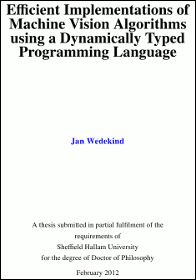
In the end I wrote a thesis about a different way of implementing machine vision systems. The thesis shows how one can implement machine vision software using a popular dynamically typed programming language (i.e. the Ruby programming language).

The listing below shows an IRB (Interactive Ruby) session to illustrate the result. Comment lines (preceded with ‘#’) show the output of the IRB REPL (read-eval-print loop). The session first opens a video display showing the camera image. After closing the window it shows a video display with the thresholded camera image.

require 'rubygems'
require 'hornetseye_v4l2'
require 'hornetseye_xorg'
include Hornetseye
input = V4L2Input.new
# #<Hornetseye::V4L2Input:0x7fbad6151a38>
X11Display.show { input.read }
# Frame(YUY2)(640,480,0x3fdd6b1972a0)
X11Display.show { (input.read.to_ubyte >= 128).conditional 255, 0 }
# MultiArray(UBYTE,2):
# [ [ 0, 0, 0, 0, 0, 0, 0, 0, 0, 0, 0, 0, 0, 0, 0, 0, 0, 0, 0, 0, .... ],
#   [ 0, 0, 0, 0, 0, 0, 0, 0, 0, 0, 0, 0, 0, 0, 0, 0, 0, 0, 0, 0, .... ],
#   [ 0, 0, 0, 0, 0, 0, 0, 0, 0, 0, 0, 0, 0, 0, 0, 0, 0, 0, 0, 0, .... ],
#   [ 0, 0, 0, 0, 0, 0, 0, 0, 0, 0, 0, 0, 0, 0, 0, 0, 0, 0, 0, 0, .... ],
#   [ 0, 0, 0, 0, 0, 0, 0, 0, 0, 0, 0, 0, 0, 0, 0, 0, 0, 0, 0, 0, .... ],
#   [ 0, 0, 0, 0, 0, 0, 0, 0, 0, 0, 0, 0, 0, 0, 0, 0, 0, 0, 0, 0, .... ],
#   [ 0, 0, 0, 0, 0, 0, 0, 0, 0, 0, 0, 0, 0, 0, 0, 0, 0, 0, 0, 0, .... ],
#   [ 0, 0, 0, 0, 0, 0, 0, 0, 0, 0, 0, 0, 0, 0, 0, 0, 0, 0, 0, 0, .... ],
#   [ 0, 0, 0, 0, 0, 0, 0, 0, 0, 0, 0, 0, 0, 0, 0, 0, 0, 0, 0, 0, .... ],
#   [ 0, 0, 0, 0, 0, 0, 0, 0, 0, 0, 0, 0, 0, 0, 0, 0, 0, 0, 0, 0, .... ],
#   ....

See the picture below for an example of a thresholded image.

The example has just 7 lines of code. The REPL furthermore facilitates experimentation with machine vision software in an unprecedented way. The system achieves real-time by generating C-programs for the required operations, compiling them to Ruby extensions, and linking them on-the-fly.

I released the software as software libre under the name Hornetseye. My thesis is available for download now, too: Efficient Implementations of Machine Vision Algorithms using a Dynamically Typed Programming Language (Bibtex).

Here’s the abstract:

Current machine vision systems (or at least their performance critical parts) are predominantly implemented using statically typed programming languages such as C, C++, or Java. Statically typed languages however are unsuitable for development and maintenance of large scale systems.

When choosing a programming language, dynamically typed languages are usually not considered due to their lack of support for high-performance array operations. This thesis presents efficient implementations of machine vision algorithms with the (dynamically typed) Ruby programming language. The Ruby programming language was used, because it has the best support for meta-programming among the currently popular programming languages. Although the Ruby programming language was used, the approach presented in this thesis could be applied to any programming language which has equal or stronger support for meta-programming (e.g. Racket (former PLT Scheme)).

A Ruby library for performing I/O and array operations was developed as part of this thesis. It is demonstrated how the library facilitates concise implementations of machine vision algorithms commonly used in industrial automation. That is, this thesis is about a different way of implementing machine vision systems. The work could be applied to prototype and in some cases implement machine vision systems in industrial automation and robotics.

The development of real-time machine vision software is facilitated as follows

  1. A just-in-time compiler is used to achieve real-time performance. It is demonstrated that the Ruby syntax is sufficient to integrate the just-in-time compiler transparently.
  2. Various I/O devices are integrated for seamless acquisition, display, and storage of video and audio data.

In combination these two developments preserve the expressiveness of the Ruby programming language while providing good run-time performance of the resulting implementation.

To validate this approach, the performance of different operations is compared with the performance of equivalent C/C++ programs.

I hope that my work has shown that the choice of programming language plays a fundamental role in the implementation of machine vision systems and that those choices should be revisited.

See also

  • HornetsEye: Ruby computer vision library (developed as part of this thesis)
  • OpenCV: C/C++ real-time computer vision library
  • NumPy: Python numerical arrays
  • NArray: Ruby numerical arrays
  • Lush: Lisp dialect for large-scale numerical and graphic applications
  • Halide: a language for image processing and computational photography
  • Maru: a symbolic expression evaluator that can compile its own implementation language

Update

The thesis is now also available on Figshare.com.

Android Hello World

Here a quick documentation on how to build a C program using the Android NDK for Linux. The program can be run with the Android Terminal.

Here’s the Makefile.

NDK = $(HOME)/android-ndk-r8b
TOOLCHAIN = /tmp/ndk-hello
SYSROOT = $(TOOLCHAIN)/sysroot
GCC = $(TOOLCHAIN)/bin/arm-linux-androideabi-gcc
STRIP = $(TOOLCHAIN)/bin/arm-linux-androideabi-strip
CFLAGS = -march=armv7-a -mfloat-abi=softfp -I$(SYSROOT)/usr/include
LDFLAGS = -Wl,--fix-cortex-a8 -L$(SYSROOT)/usr/lib

all: $(TOOLCHAIN) hello

hello: hello.o
	$(GCC) $(LDFLAGS) -o $@ hello.o
	$(STRIP) -s $@

.c.o:
	$(GCC) $(CFLAGS) -o $@ -c $<

clean:
	rm -f hello *.o .*.un~

$(TOOLCHAIN):
	$(NDK)/build/tools/make-standalone-toolchain.sh --install-dir=$@

And here’s the C program hello.c.

#include <stdio.h>

int main(int argc, char** argv) {
   printf("Hello world!!!\n");
   return 0;
}

Running make should cross-compile the program.

Racket on Android

A smart smartphone

The recent smartphones have quite impressive specs. E.g. the Samsung Galaxy S III comes with a 1.5 GHz quad-core processor and a GPU. It would be interesting though to run a real programming language on one of those phones. I am quite interested in the Racket programming language (also see Wikipedia) which offers full meta-programming and compile-time macros. I managed to cross-compile Racket to run on an Android phone HTC Desire S. I’ll describe the steps here. Hopefully I’ll find time to improve things and package it in some way.

Build

To cross-compile Racket for ARM you first need to compile Racket for the host system. The GCC cross-compiler and the Racket interpreter are then used during the cross-compilation.

#!/bin/sh
ARCHIVE=$HOME/Documents/programming/racket-5.2.1-src-unix.tgz
rm -Rf /tmp/build
mkdir -p /tmp/build/host
cd /tmp/build/host
tar xzf $ARCHIVE
BUILD_HOST=/tmp/build/host/racket*
cd $BUILD_HOST/src
./configure
make install
mkdir -p /tmp/build/cross
cd /tmp/build/cross
tar xzf $ARCHIVE
BUILD_CROSS=/tmp/build/cross/racket*
cd $BUILD_CROSS/src
./configure --host=arm-linux-gnueabi
make \
  RUN_THIS_RACKET_CGC=$BUILD_HOST/src/racket/racketcgc \
  RUN_THIS_RACKET_MMM=$BUILD_HOST/src/racket/racket3m \
  RUN_THIS_RACKET_MAIN_VARIANT=$BUILD_HOST/src/racket/racket3m \
  HOSTCC=/usr/bin/gcc \
  HOSTCFLAGS="-g -O2 -Wall -pthread -I./include" \
  STRIP_DEBUG="arm-linux-gnueabi-strip -S" 
make \
  RUN_THIS_RACKET_CGC=$BUILD_HOST/src/racket/racketcgc \
  RUN_THIS_RACKET_MMM=$BUILD_HOST/src/racket/racket3m \
  RUN_THIS_RACKET_MAIN_VARIANT=$BUILD_HOST/src/racket/racket3m \
  HOSTCC=/usr/bin/gcc \
  HOSTCFLAGS="-g -O2 -Wall -pthread -I./include" \
  STRIP_DEBUG="arm-linux-gnueabi-strip -S" \
  install
cd $BUILD_CROSS/src/racket
arm-linux-gnueabi-gcc -static -o racket3m  gc2/main.o libracket3m.a  -ldl -lm  -ldl -lm -rdynamic

The last command is used to replace the racket3m binary with a statically linked version.

Installation

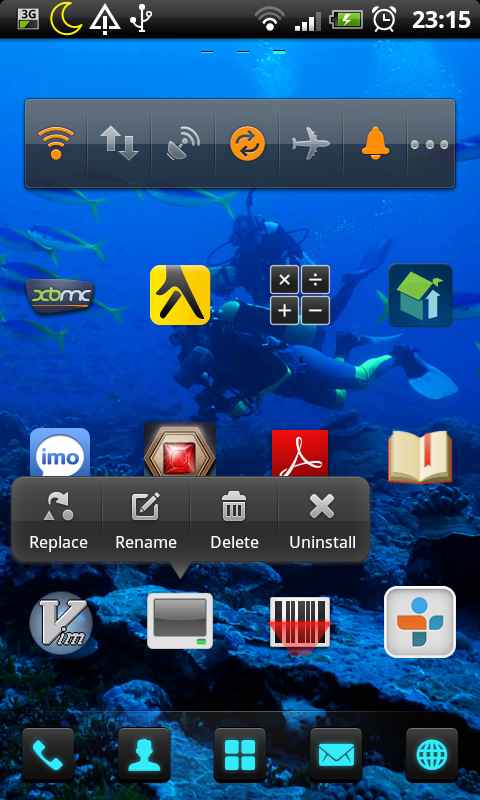
First I installed Android Terminal Emulator. I also installed Kevin Boone’s kbox_shell which allows you to run BusyBox without requiring to jailbreak the phone (I don’t think BusyBox is required to run Racket but it is nice to have the various Linux shell utilities). I really recommend to install Hacker’s Keyboard to have a full PC keyboard on your phone.

Android Terminal Emulator

Then one needs to copy the following files to the mobile phone:

  • The racket3m binary is copied to the mobile in a location where it can be accessed from the terminal (e.g. /data/data/jackpal.androidterm/shared_prefs/kbox/bin/racket if you have kbox_shell installed).
  • Several Racket modules located in /tmp/build/cross/racket-5.2.1/collects/… need to be copied to $HOME/.racket/5.2.1/collects on the mobile phone. The libraries are
    • racket
    • syntax
    • setup
    • config
    • compiler
    • planet
    • mzlib
    • scheme
    • unstable
    • mzscheme

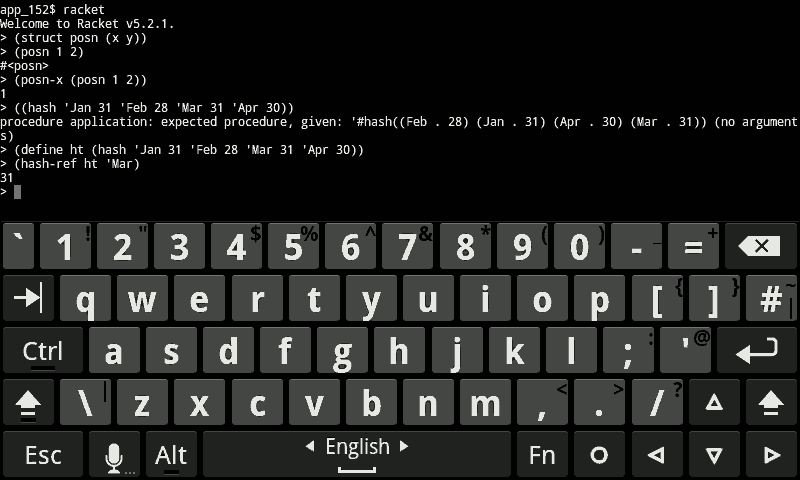
Racket on Android Unfortunately the full Racket language takes 90 seconds (!) to load on the HTC Desire S. Once loaded, the REPL is very responsive though.

Racket interpreter running on Android

Hopefully I get ffi and the readline library working to have an improved command line.

Any comments and suggestions are welcome

Update

It is possible to only load the Racket base language. Running the following command

racket -I racket/base

brings up the REPL in 7 seconds. Thanks Robby for the helpful comment!

Update

Racket 5.3.0 furthermore needs the following module to be installed:

  • s-exp

Update

I haven’t managed to build Racket with the Android NDK (see my thread on the Racket mailing list). Building Racket with the Android NDK would be preferable because otherwise it is impossible to dynamically load Android libraries in order to access Android specific functionality.

Clojure for Schemers

Recently I found a video of an interesting presentation by David Nolen (homepage, blog) (comparing the Clojure programming language with Scheme (Racket). Some important points made in the talk are:

  • The Little Schemer, The Seasoned Schemer, and The Reasoned Schemer are great Q&A-style books for getting to grips with the Scheme programming language.
  • Clojure does not support optimisation of tail-recursion leading to stack overflows. However one can use lazy sequences instead.
  • Clojure does not support continuations.
  • The frequent destructuring of data using car and cdr in Scheme is cumbersome. Clojure on the other hand has syntax support for various immutable data structures (lists, vectors, hashes, and sets) which makes for more readable code.
  • Clojure is a great platform for exploring concurrency (atoms, refs, agents, promises, and futures).

David Nolen concludes that it is not a question of either/or.

See also: